Announcements

  1. πŸ›’ Purchase Orders Just Got Major Upgrades

    New Feature
    Improvement

    If you've been on the fence about using Purchase Orders, now's the time to give them a shot. We've completely redesigned the PO creation experience to be faster, smarter, and a whole lot easier to use, whether you're sending one order or managing dozens.

    Whats New

    Progress Tracker & Quick Navigation

    A new section indicator in the upper-right corner shows you exactly where you are in the PO creation process. Sections light up as you complete them, and you can click on any section to jump directly to it, no more endless scrolling.

    πŸ’Ύ Unsaved Draft Mode

    Accidentally close the tab? No problem. PO creation now auto-saves your progress locally in your browser. When you return, you'll be prompted to restore your draft right where you left off.

    πŸ“‹ Sticky Order Summary Panel

    A new Order Summary module follows you as you scroll, keeping a live view of your item count, ship-to info, selected supplier, subtotal, tax, and total always within reach. Collapse it when you don't need it, expand it when you do.

    πŸ“¦ Smarter Delivery & Pickup Handling

    Selecting Will Call / Pickup now automatically removes the delivery address fields, keeping the form clean and relevant. When a supplier is selected, their address pre-fills automatically on the PO PDF.

    ⚠️ Inline Validation

    Missing a required field? Instead of a generic error, Ply will now scroll you directly to the incomplete section so you can fix it fast and keep moving.

    🎨 Refreshed Layout & Redesigned Modules

    We've cleaned up spacing and reorganized key elements throughout the form and including the Requested Items section, Additional Charges module, and the Supplier selection area ,giving you more room to work and a cleaner overall experience.

    ⌨️ Keyboard Shortcuts

    Power users, this one's for you:

    • Cmd/Ctrl + S: Save as draft
    • Cmd/Ctrl + Enter: Send PO to supplier

    Why Start Using Purchase Orders?

    Purchase Orders are the backbone of a tight procurement process. With Ply's PO flow, you can:

    • Control spending before it happens, not after
    • Keep suppliers accountable with a paper trail for every order
    • Automatically update inventory when materials are received
    • Eliminate manual reconciliation by tying POs directly to your materials catalog

    This redesign makes it easier than ever to get started. Give it a try and create your first PO here.

    Add a comment

    Comments

  2. New QBO Sync, Custom Email Domains & Inventory Reporting Upgrades + More!

    Improvement
    Fix
    Announcement
    New Feature

    Highlights

    • Sync Individual POs to QuickBooks Online: select and sync specific purchase orders to QBO on demand. No more waiting for batch syncs on time-sensitive orders.
    • Custom Email Domains for POs & RFQs: Send purchase orders and RFQs from your company's branded email address instead of a generic sender. Configure here!
    • Item Numbers in Inventory Usage Reports: cross-reference materials with your supplier catalogs and existing systems more easily.

    New Features

    • Editable Inventory Adjustment Reasons: Made a mistake? You can now update the reason on an inventory adjustment after it's been saved.
    • Quantities During Pick List Selection: Specify quantities while selecting materials for pick lists, cutting out extra steps.
    • Location Breakdown Tooltips: Hover over quantity columns in the catalog to see stock by location at a glance.
    • PO Title in Supplier Communications: The "Title" field now appears in PO emails and PDFs sent to suppliers for added context.

    Improvements

    • Barcode scanning now returns more comprehensive results across all relevant locations.
    • Kit deletions from jobs now show as a single consolidated activity in movement reports.
    • Movement Report exports now clearly indicate adjustment directions.
    • Added validation to prevent duplicate materials during bulk catalog edits.
    • Cleaned up notification settings by removing outdated financing options.

    Bug Fixes

    • Fixed rolling pick list editing issues where non-replenishable items appeared incorrectly.
    • Resolved kit materials appearing twice after being added to a pick list.
    • Corrected min/max amounts showing as 0/0 when editing material availability.
    • Fixed running totals and phantom "Without Reason" entries in movement reports.
    • Resolved historical inventory discrepancies affecting truck inventory accuracy.
    • Fixed duplicate serial numbers being accepted during entry.
    • Resolved ServiceTitan integration page crashes.
    • Improved PO reconciliation calculations and serial number display during receiving.
    • Vendor filters now persist when navigating between purchase orders.
    • Fixed slow performance when copying from location templates.
    • Consumables and kits now properly clean up when locations are deleted.

    As always, please let us know how we're doing by chatting with us or contacting support@getply.com. If you have a feature request you can also add it to our ideas board here!

    Add a comment

    Comments

  3. Work Anywhere with Mobile Offline Mode

    New Feature
    Improvement

    Never lose productivity because of poor signal again.

    We know you're often working in warehouses, job sites, trucks, or remove areas where internet connectivity isn't always reliable. That's why Ply now works offline.

    What you can do offline:

    βœ“ Browse your inventory - View all your locations and materials

    βœ“ Create transfers - Move materials between locations

    βœ“ Submit purchase orders - Order materials from suppliers

    βœ“ Update quantities - Adjust stock counts as you work

    How it works:

    When you log in, Ply automatically downloads your data to your device. If you lose connectivity, just keep working - your actions are saved locally. When you're back online, everything syncs automatically. No extra steps needed.

    Getting started:

    Just update to the latest version of your mobile applications and use Ply as you normally would. Offline mode works automatically - there's nothing to configure.

    Add a comment

    Comments

  4. πŸ“±Mobile App Update: Smarter Purchasing & Field Request Improvements

    New Feature
    Improvement
    Announcement

    We've just released updates to both our iOS and Android apps with features designed to save you time when creating purchase orders and managing materials in the field.

    Preferred Supplier Selection on Purchase Orders (iOS)

    Creating POs just got faster. You can now choose to use your Preferred Supplier for each material when building a purchase order, letting Ply automatically route items to the right vendors based on your saved preferences. No more manually selecting suppliers for every line item. Just review and submit.

    You can also set and manage preferred suppliers directly from each material variant's settings.

    Add Kits to Field Requests (iOS & Android)

    Your team can now add entire kits when creating field requests from a job. Instead of requesting individual materials one by one, techs can select pre-built kits to speed up the process and ensure they're getting everything they need for the job.

    Improved Kit Creation (iOS)

    When creating new kits, you'll now see a dedicated Stock Setup step just like on web so you can configure storage locations and kit positions right from your phone.

    Barcode & Scanning Improvements (Android)

    We've added a Generate Barcode button for easier label creation, and improved the scanner experience when capturing multiple items.

    Ferguson Integration Update (iOS)

    For businesses connected to Ferguson, integrated suppliers now display a clear "Integrated" badge, making it easier to distinguish them from your other vendors.

    Additional Improvements

    • Better search on POs, now includes line items in results (iOS)
    • Supplier UPC support for materials (iOS)
    • Photo preview fixes in the catalog (Android)
    • Various stability and compatibility fixes across both platforms

    Add a comment

    Comments

  5. Rolling Replenishment v2, PO Controls, Tools Workflow, Supplier Pricing + MORE!

    New Feature
    Announcement

    We shipped improvements to rolling replenishment and PO reliability, new controls for PO communications, simpler tool and field workflows, better supplier pricing visibility, and faster template editing. These updates are now live in production.

    Major Updates:

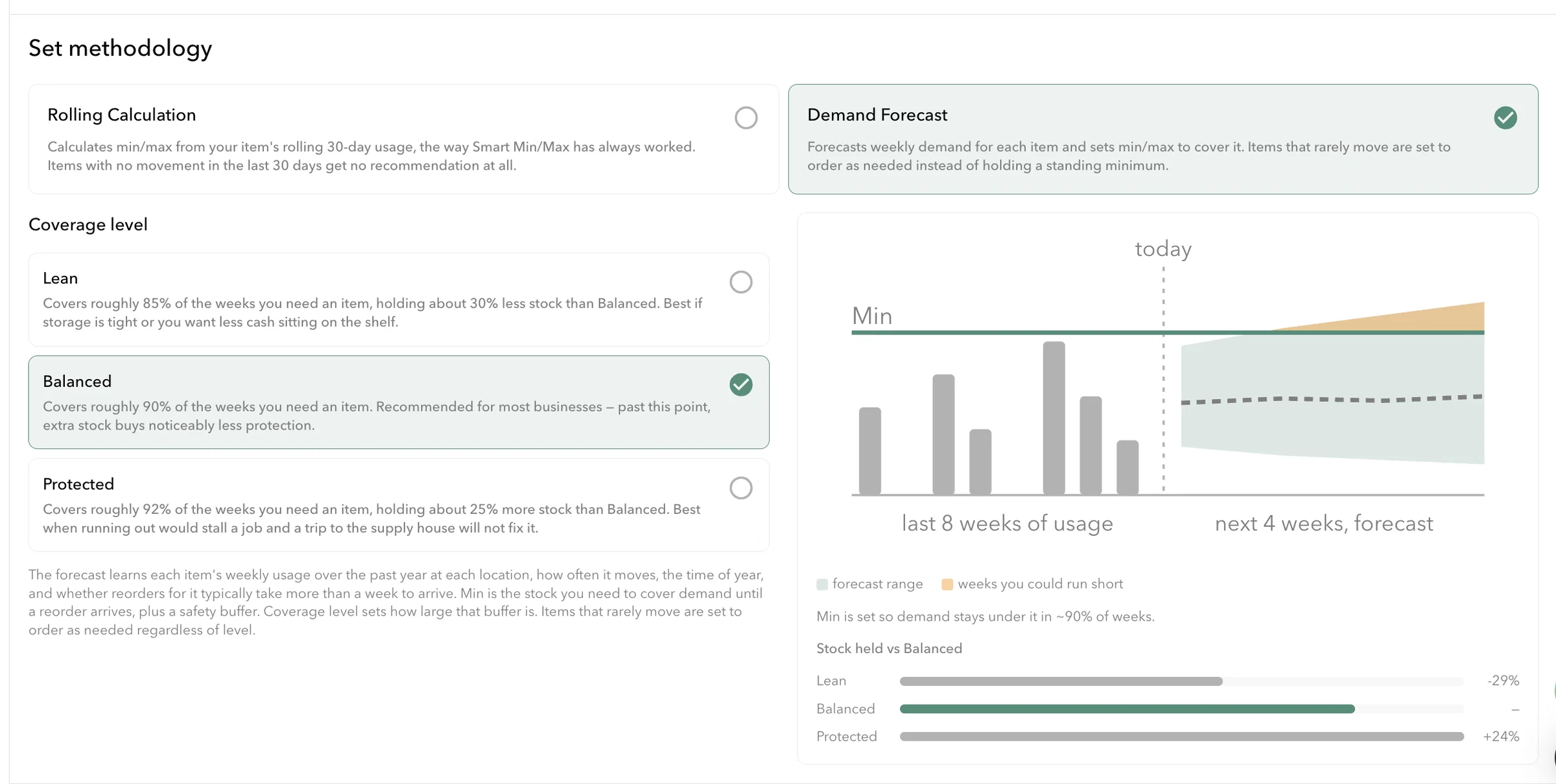
    • Rolling Replenishment settings improvements: refined replenishment controls to make automatic ordering more predictable and easier to tune. Manage Replenishment Automation here
    • PO reconcile reliability updates: Improved reconcile logic so purchase orders sync and settle more consistently across systems.
    • Control customer integrations within POs: new option to choose whether a PO interacts with integrations, giving you finer integration control.
    • Toggle to send or hide prices in supplier communications: boolean setting to include or exclude item prices when sending POs to suppliers.
    • Techs can assign tools to themselves: field techs can now claim tool ownership directly in the app for clearer on site accountability.
    • Kits marked as job inputs with restricted transfers: mark kits as job inputs to prevent accidental transfers and keep job inventory accurate.
    • Default job transfer reason set to Consumed: new default transfer reason, Consumed, reduces manual corrections for common field workflows.
    • Supplier price range column for integrated suppliers: see supplier price ranges at a glance to compare pricing when creating or reviewing POs.

    Minor updates and fixes:

    • Improved QuickBooks Online mapping fields: better mapping between QBO and Ply to reduce errors when creating POs from QuickBooks data.
    • Add materials to templates while editing: add items directly into a template during editing to speed up template maintenance.
    • Jobber setting to prevent attaching PO links to jobs: new integration option to stop PO links from being added to Jobber job notes.
    • Improved handling of kit transfer activity: transfer activity for kits is now clearer and more reliable in activity logs and audits.
    • Movement report shows plus and minus indicators: inventory movement numbers now include clear plus and minus markers for easier reading.
    • Fix for pasting text into PO comments and chat: resolved an issue so you can paste text into PO comments and the PO chat without errors.
    • Included in this release is 30+ UI and bug fixes

    Questions or feedback

    Reply to this announcement or contact support@getply.com to request a walkthrough or report an issue.

    Add a comment

    Comments

  6. Ply + Zapier Is Here!

    Announcement
    New Feature

    Ply now connects directly to Zapier, making it easy to automate workflows between Ply and the tools you already rely on.

    With Zapier, Ply becomes the system of record for inventory, purchasing, and locations, while your other systems stay in sync automatically. No custom development. No manual exports. Just real time events flowing where they need to go.

    Connect Ply to 6,000+ apps like Slack, Google Sheets, Airtable, Notion, QuickBooks workflows, CRMs, and internal tooling.

    Every meaningful event in Ply can now trigger workflows in other tools automatically. Inventory stays aligned. Purchasing moves faster. Teams stay informed without extra work.

    Use Zapier to:

    β€’ Sync inventory changes to spreadsheets or dashboards

    β€’ Notify teams when purchase orders are created or received

    β€’ Keep external systems updated as locations and trucks change

    β€’ Automate onboarding and internal workflows

    Inventory and Materials

    β€’ Material created

    β€’ Material updated

    β€’ Material deleted

    β€’ Inventory quantity updated

    Automatically trigger workflows whenever materials are added, changed, removed, or when on hand quantities change at any location.

    Locations

    β€’ Location created

    β€’ Location updated

    β€’ Location deleted

    Includes warehouses, trucks, vans, and any stock location managed in Ply.

    Purchase Orders

    β€’ Purchase order created

    β€’ Purchase order updated

    β€’ Purchase order status changed

    Every stage of the purchase order lifecycle can trigger downstream automation.

    Users

    β€’ User created

    β€’ User updated

    Explore Ply on Zapier

    Add a comment

    • A
      Adam

      LOVE THIS A LOT. Already tested it with POs. We use Trello and I was able to create a zap in Zapier that added all new POs to our Trello board. Love it!!

      BUT, we missed a huge opportunity to include Field Requests as an event. I would love to see New Field Requests as an option to the events in Zapier. I have created a feature request as an upgade to this. PLEASE!!

    Comments

    1

  7. πŸ“’ New in Ply: Picklist Search, Selective Catalog Export, Consumables Bulk Edit, Serial Number Improvements, and Redesigned Field Requests

    Improvement
    Announcement
    New Feature

    Well hello there! This week we shipped over 75 features and bug fixes with a focused set of updates to speed up picking, exporting, and catalog maintenance, and to make field requests easier to create and manage. Here is what changed.

    Highlights

    β€’ Picklist search and filters: find pick lists and items faster using search terms and filter controls in the Picklists page.

    β€’ Export selected materials from Catalog export: choose specific materials to include when exporting Stock or Catalog data, export only what you need.

    β€’ Bulk edit mode for consumables: update consumable items in bulk to save catalog maintenance time.

    β€’ View serial numbers in return details: see the exact serials associated with a return for clearer traceability.

    β€’ Expanded field request creation and redesign: more users can create field requests based on admin settings, and the Field Requests flow has a cleaner, easier to use design.

    Other enhancements and fixes

    β€’ Show PARTIAL SUCCESS messages in QuickBooks Online PO sync: sync results are clearer when some lines succeed and others do not.

    β€’ Bulk update progress: the UI now displays only the relevant progress stages to reduce noise during large updates.

    β€’ Material activity on PO creation: catalog activity entries are now recorded when a PO is created and not only when it is reconciled.

    β€’ Duplicate serial validation: added checks to prevent the same serial number from being entered for the same material across locations.

    Where to find these features

    β€’ Picklist search and filters: open Picklists on the web app.

    β€’ Selective Catalog export and Bulk Edit for consumables: open Catalog then Export or Bulk Edit.

    β€’ Return serial view: open a Return from a PO and check Return Details.

    β€’ Field Requests redesign and settings: open Field Requests, or go to Settings to adjust who may create requests.

    β€’ QuickBooks sync messages and bulk update progress: check Integrations and the Bulk Update UI.

    If you would like a walkthrough or to enable any setting for your account, reply here or contact support@getply.com. Your feedback helps us prioritize what to build next.

    Add a comment

    Comments

  8. πŸš€ New in Ply: HCP Sync, Field Request FIFO, Supplier Filters, and Better Serial Number Validation

    New Feature
    Improvement
    Fix

    We shipped a focused set of updates this week to improve integrations, make field requests more predictable, and give you better visibility over supplier emails and serial numbers.

    βœ… Highlights

    β€’ HCP employee sync redesigned, sync logic is more reliable for employee records in Housecall Pro

    β€’ Field Requests FIFO reconcile, requested materials are reconciled and transferred in first in

    β€’ PDF download from notifications in app, save supplier quotes

    β€’ View sent supplier emails on the PO page

    πŸ”§ Other enhancements and fixes

    β€’ Filter Purchase Orders by supplier in the PO list

    β€’ Find duplicate serial numbers across all locations for the same material

    β€’ Expanded serial number uniqueness validation to all business locations

    Where to find these features

    β€’ HCP sync settings: Integrations then Housecall Pro in Settings

    β€’ Field Requests reconcile: open a Field Request or PO then use Reconcile to see FIFO behavior

    β€’ Notification PDFs: Notifications center on web and mobile

    β€’ Sent supplier emails and PO filters: Purchase Orders page, open a PO to view sent messages

    Add a comment

    Comments

  9. πŸš€New in Ply: Reconciliation Controls, Price Lock Rework, UPC Search, Kits in Field Requests, and PO Cancellation Notifications

    New Feature
    Improvement
    Announcement

    We updated reconciliation and price controls, added UPC search and kit support in field requests, and improved PO cancellation notifications, along with several sync and UI refinements.

    βœ… Major

    • Input client price during reconciliation: when reconciling a PO you can now enter the client price directly, so job billing and margin calculations match what you actually charge.
    • Price lock settings rework: price lock permissions have been reorganized, making it clearer who can view and who can edit material prices across the catalog and transfers.
    • UPC search filter: add UPC as an optional search filter when looking up materials, so you can find supplier items faster.
    • Kits allowed in field requests: techs can now add entire kits to field requests, making it easier to request grouped parts from the field.
    • Vendor cancellation emails for pending approvals: when a PO is canceled while it is pending approval, the vendor will receive a cancellation email so suppliers are kept in the loop.

    πŸ› οΈ Other enhancements and fixes

    • Improved job syncing for all FSM integrations, so job and material data stay more consistent
    • Bin locations now sort alphabetically rather than numerically, making physical location lookups simpler for many warehouses
    • PO chat optimizations to reduce noise and improve message delivery
    • Returns can no longer use a return date earlier than the PO received date, preventing accidental backdating
    • Additional settings redesign for easier navigation and clearer controls
    • Prefix matching when importing items from Sage to improve catalog matches
    • Various FSM specific improvements for more reliable integrations

    If you want a walkthrough, or to enable any of these features for your account, reply here or contact support@getply.com. We appreciate your feedback and testing.

    Add a comment

    • Y
      Yaddiel

      hello can i get a walk through of this?

    Comments

    1

  10. πŸš€ New in Ply: Bulk material update, replenishment filters, serial numbers in returns

    New Feature
    Improvement
    Fix
    Announcement

    In this weeks we shipped updates that make returns, replenishment lists, and bulk catalog edits faster and more accurate so your team can track items and manage inventory with less hassle.

    βœ… Major

    • Bulk upload update to mass update material data - this can be found within the catalog under the three dots
    • Ability to reconcile materials with serial numbers in returns
    • Filter materials in replenishment lists
    • Sending POs will now include all recipients on one email

    πŸ”§ Minor

    • Pre-fill shipping data during PO creation
    • Added hyperlinks in material descriptions
    • Sort by position in inventory cycle counts
    • Kit's image is now copied when user copies kit
    • Add ability to edit company logo in business settings

    Other

    • Lots of UI refreshes including catalog and settings
    • Integration fixes and bugs across all integrations

    We really appreciate your feedback and ideas to improve Ply!

    Add a comment

    Comments